Singing Practice Room
Singing Practice Room
Change the key of any song by semitones, slow it down without changing pitch, make a quick karaoke track, loop hard parts and save as MP3.
Use it now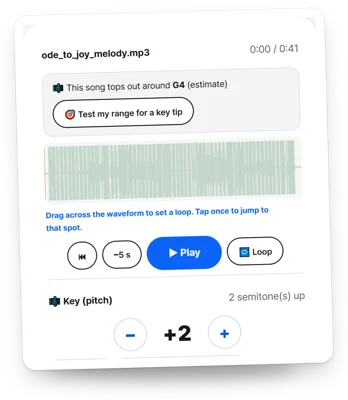
1Upload a song
Only upload music you own or are allowed to practice with. YouTube links aren't supported.
Male and female keys usually differ by 3–5 semitones. Test your range and we'll suggest the right key for this song. Changing by more than ±4 can make the sound a little smeared.
Changing speed keeps the pitch the same. Loop the hard part slowly, then speed it up bit by bit.
Guide vocal:
Sing along loud at first, then drop it to 0% for the backing track only.
Simple mode can leave some vocals depending on the song. For a clean result, split it with the AI vocal remover, then tap 'Send to Singing Practice'on the result screen. You can practice with the original vocal at 0–100%.
The tempo is detected automatically (it can be wrong). If the click drifts, tap 'Beat 1 is now' right on the downbeat.
📝 Show lyrics karaoke-style
The song plays from the start. Tap the button once as each line begins — that's it! It's saved on this device, so the same file shows lyrics right away next time. Lyrics are never uploaded.
2Save with your changes
Download with the key, speed and karaoke settings you chose. Great for wedding songs, recitals and auditions.
3Record yourself and listen back
Records from the loop start if there's a loop, otherwise from the current position.
🎯 Test my vocal range 30 seconds
- ① Low notes
- ② High notes
- ③ Results
Hold each note for about 0.5 s to record it. Coughs and speech are mostly ignored.
🎉 My vocal range
Voice type (estimate): –
The voice type is a rough estimate from range only. Your real voice part also depends on tone and comfortable range.
🎼 Which key should I sing this song in?
📈 Overlay your voice on the original melody
First, upload a song in the Practice tab.
- Extract the melody line — a vocals-only (a cappella) file is much more accurate. AI vocal remover: you can download just the vocals there.
- Put on earphones and tap Start singing along. The green line is the original, the orange line is you.
–
The key, speed and loop from the Practice tab apply here too. With busy backing tracks the melody line may be off. No score is given — it's for seeing how closely the lines overlap.
🔥 Warm up before singing (vocal exercises)
The piano plays a chord to give the starting note, then you sing the pattern. Each round moves up a semitone.
Test your range and we'll set the start and end notes for you.
💡 Warm-up tips
- Singing "ma-me-mi-mo-mu" or a lip trill ("brrr") keeps tension out of your throat.
- If your throat tightens on high notes, stop there and come back down. If it hurts, rest first.
- 5–10 minutes is plenty. Have a sip of water before you start.
⏱️ Long tone — hold one note
Take a deep breath and sing "ahh"on a comfortable note, as long and as evenly as you can. It stops automatically after a 0.5 s break.
📒 My practice records
How to change the key of a song
Upload a song, press − or + to move it by semitones, then save it as MP3.
Read more
Tap the upload box and pick a song or backing track from your phone or computer. Videos (MP4, MOV) work too — only the sound is used. Then use − and + to lower or raise the key one semitone at a time while it plays, so you can hear the change straight away.
Speed and key are independent: slow a fast verse to 80% without the pitch dropping, or drop the key by 2 without the song dragging. When it feels right, tap Save MP3 and the file keeps exactly the key and speed you chose.
Find your vocal range in 30 seconds
Sing “ah” from your lowest note to your highest — the result shows on a keyboard.
Read more
The test guides you in two steps: first slide down to your lowest comfortable note, then up to your highest. Each note has to be held for about half a second, so coughs and speech are ignored.
Your comfortable top note is set one semitone below the highest note you reached. When you upload a song, the app estimates the song’s highest note and suggests a key, for example −2. One tap applies it. Your range is saved on this device, so you can watch it grow over weeks of practice.
Practise like a singer, not just a listener
Lyrics, loops, a guide vocal and recordings in one place.
Read more
Paste the lyrics and tap once at the start of each line — they then scroll like karaoke every time you play. LRC files with timestamps work as well.
For a cleaner backing track, split the song with the AI vocal remover and send it here with one tap. You can then fade the original singer from 100% (sing along) down to 0% (just you). The pitch tab draws the original melody and your voice as two lines so you can see where you go flat or sharp.
Warm up and build breath
Short daily exercises with a piano guide.
Read more
The warm-up plays a chord and the starting note, you sing the pattern, and it moves up a semitone each round. If you measured your range, start and end notes are set for you.
The long-tone exercise times how long you can hold “ah” and how steady the pitch is (in cents). Five to ten minutes before you sing is enough. Stop if your throat feels tight.
FAQ
Is the song key changer free?
Does changing the key make the song faster or slower?
Can I save the song in the new key?
How many keys should a man lower a female song?
Can I paste a YouTube link?
Are my songs or my voice uploaded?
More music tools
© 2026 sselmo.com · free tools for everyone · Privacy policy · Terms of use · Open-source licenses
Your songs and recordings are never uploaded — everything runs on this device. Key/speed engine: Signalsmith Stretch (MIT); piano: Salamander Grand Piano (CC BY 3.0).