Melody sheet music from a song — with lyrics and solfège
Make a one-line melody score from a song — a pop song, a children’s song or one you sang yourself. Turn on solfège (do-re-mi) and even people who don’t read music well can sing along.
- One-line melody score
- Solfège do-re-mi
- Add lyrics
- Key ♭ ♯
Melody sheet music from a song
Melody sheet music from a song — with lyrics and solfège
Turn the melody of a song into a single-line score.
Use it nowUse it when you want to
- Get a melody-only score to practise a song
- Add solfège so you can sing with a child
- Lower the key of the melody to suit your voice
- Write down the melody of a song you recorded
How to make a melody score
- Upload the songUpload an MP3 or WAV. You can choose just the Vocals (melody) part.
- Make sheet musicQuick draft finds the sung melody in the whole song quickly.
- Attach lyricsPaste the lyrics one phrase per line and they appear under the notes.
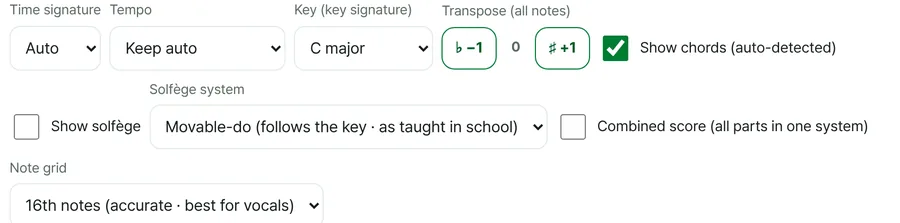
- Solfège and keyTurn on Show solfège and use ♭ / ♯ to move to a comfortable key.
- Save as image or PDFUse 'Save melody score as image' to keep it on your phone, or print a PDF.
Real screenshots
Tips
- If the backing is loud, first pull out the vocals with the vocal remover — the melody comes out more accurately.
- If the notes are too finely split, try another option under 'Note grid'.
- Pick movable-do (follows the key, as taught in many schools) or fixed-do (C is always do).
- Copyright: scores made from other people’s songs are for personal practice only. Publishing or sharing them needs permission from the rights holder.
FAQ
Can I make sheet music of a pop song?
For your own practice, yes. To post or share the score you need permission from the rights holder.
Does it show solfège (do-re-mi)?
Yes. Turn on Show solfège and it appears under the notes. Choose movable-do or fixed-do.
Can I lower the key?
Yes. Each press of ♭ −1 lowers it by a semitone.
Can I save it as a picture?
Yes. Press 'Save melody score as image'.
Is it accurate?
The automatic result is a draft. Compare with ▶ Play and tap wrong notes to fix them.
Just add a file to start — free, no sign-up
sselmo music tools
More guides
- Suno to sheet musicTurn a Suno song into a score
- MP3 to sheet musicTranscribe a song file into notes
- Piano accompaniment makerA piano part from the chords
- Song melody sheet musicMelody score with lyrics & solfège
- Karaoke track makerRemove vocals for a backing track
- Backing track for coversBacking tracks for cover videos
- Export sheet musicPDF, MusicXML or MIDI
© 2026 sselmo (sselmo.com) · Trademark application 40-2026-0132938 · Free tools for everyone
Your audio never goes online — it is processed only in this browser. Suno is a trademark of Suno, Inc. and is not affiliated with sselmo.
The program, design and text on this page are sselmo’s work. Do not copy, modify or redistribute without permission. · Checked 2026-11-21