MP3 to sheet music — automatic song transcription
Writing down a song by ear note by note takes hours. Let AI do the first pass: upload the song file, get a draft score with the melody and chords, and just fix the notes that are wrong.
- MP3 · WAV · M4A · FLAC · MP4
- Chords & solfège added
- Free · no sign-up
- Runs on your device
MP3 to sheet music — automatic song transcription
Upload an MP3 or WAV and AI transcribes the notes it hears into sheet music.
Use it now
Use it when you want to
- There is no sheet music for the song you want to practise
- You want to keep a recording or humming of your own song as a score
- You need the chord progression quickly before a rehearsal
- You want to write down a song from a video (MP4)
How to turn an MP3 into sheet music
- Upload the song fileMP3, WAV, M4A, FLAC or the sound of a video (MP4). If you have a MIDI or MusicXML file, upload that — it is more accurate.
- Choose a mode‘Quick draft’ works on the whole song without AI separation and finds the sung melody and chords fast. ‘Precise mode’ separates vocals and instruments first and transcribes each part, so it takes longer.
- Set a range (optional)The whole song is the default. To try only part of it, turn off ‘Whole song’ and enter the start and length in seconds.
- Make the scoreChrome or Edge on a PC is recommended. Keep the tab open and the screen on until it finishes.
- Listen and fixCompare with ▶ Play and tap wrong notes to fix them. Every fix is saved automatically, and you can always go back to the first result.
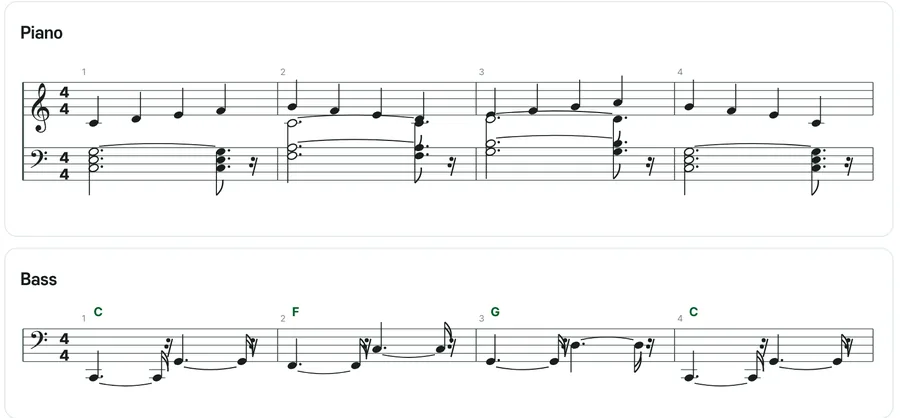
Real screenshots
Audio that transcribes well — and audio that doesn’t
- Works well: clear vocals with little reverb or harmony, and songs with few instruments.
- Harder: thick choruses and harmonies, very reverberant audio, and low-quality MP3s that were compressed many times.
- If the backing is loud, pull out the vocals with the vocal remover first — the result is more accurate.
- Automatic transcription is a draft, not 100% accurate. Always listen and check.
FAQ
How accurate is MP3 to sheet music?
It depends on the song. Files with only the melody (vocals only) are the most accurate; an MP3 with backing gets more wrong notes. Listen to the result and fix it.
Which files can I upload?
MP3, WAV, M4A, FLAC, MP4, MIDI, MusicXML, and a Suno stems zip.
Does it work on a phone?
Yes, but it can be slow or stop. For long songs use Chrome or Edge on a PC. On a phone, keep the screen on — switching to another app pauses it.
Can it show solfège (do-re-mi)?
Yes. Turn on Show solfège on the result screen. Choose movable-do (follows the key) or fixed-do (C is always do).
Can I transcribe someone else’s song?
For your own practice only. Sharing or publishing the score needs permission from the rights holder.
Just add a file to start — free, no sign-up
sselmo music tools
More guides
- Suno to sheet musicTurn a Suno song into a score
- MP3 to sheet musicTranscribe a song file into notes
- Piano accompaniment makerA piano part from the chords
- Song melody sheet musicMelody score with lyrics & solfège
- Karaoke track makerRemove vocals for a backing track
- Backing track for coversBacking tracks for cover videos
- Export sheet musicPDF, MusicXML or MIDI
© 2026 sselmo (sselmo.com) · Trademark application 40-2026-0132938 · Free tools for everyone
Your audio never goes online — it is processed only in this browser. Suno is a trademark of Suno, Inc. and is not affiliated with sselmo.
The program, design and text on this page are sselmo’s work. Do not copy, modify or redistribute without permission. · Checked 2026-11-22