Piano accompaniment maker — get a playable piano part from the chords
Have the melody but no accompaniment? sselmo finds the chords and writes a left- and right-hand piano part. Switch patterns to find one that fits the song.
- 4 accompaniment patterns
- Grand staff, both hands
- Transpose ♭ ♯
- Print as PDF
Piano accompaniment maker
Piano accompaniment maker — get a playable piano part from the chords
Make playable piano accompaniment sheet music from the chords found in a song or MIDI file.
Use it now
Use it when you want to
- Accompany a singer when you only have the melody
- See what chord accompaniment looks like while learning piano
- Get a simple part to play at a small event or group
- Try different accompaniment patterns for your own song
How to make the accompaniment
- Upload a song or MIDIWith a song file (MP3, WAV) the AI finds the chords; a MIDI or MusicXML file is read as is.
- Make sheet musicYou first get a basic score with the melody and chords. Chord names (C, Am …) appear above the bars.
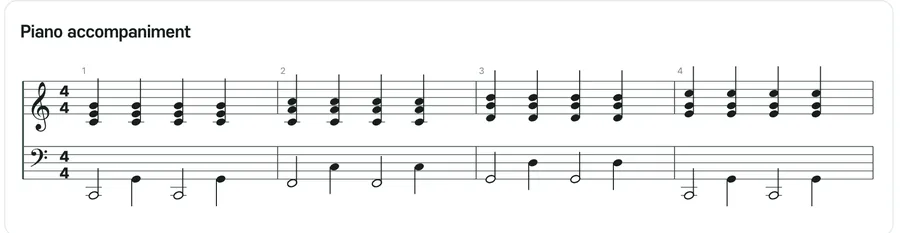
- Pick a patternUnder the piano accompaniment score, choose Basic (block chords), Arpeggio, Ballad (broken 8ths) or Waltz · 3/4.
- Press 'Make a piano part from the chords'You get right-hand chords and a left-hand bass line. Change the pattern and press again to rebuild it.
- Set the key and printUse ♭ −1 / ♯ +1 to fit the singer’s range, then save as PDF.
Real screenshots
Tips
- If a chord was detected wrongly, tap the chord name to change it, then rebuild the accompaniment.
- Slow songs suit Ballad (broken 8ths); songs in 3 suit Waltz · 3/4.
- Only need to change the key of an existing score? Use the music transposer.
- Want to write by hand? Print blank sheet music.
FAQ
Which accompaniment patterns are there?
Four: Basic (block chords), Arpeggio, Ballad (broken 8ths) and Waltz · 3/4. Change it and press again to rebuild.
Where do the chords come from?
sselmo finds them in the song or MIDI you upload. You can tap a chord name on the result to change it.
Can I lower the key?
Yes. Transpose by a semitone at a time with ♭ −1 and ♯ +1.
Can I print it?
Yes. Save as PDF and print, or download MusicXML to edit in notation software like MuseScore.
Is it free?
Yes. Free, with no sign-up or login.
Just add a file to start — free, no sign-up
sselmo music tools
More guides
- Suno to sheet musicTurn a Suno song into a score
- MP3 to sheet musicTranscribe a song file into notes
- Piano accompaniment makerA piano part from the chords
- Song melody sheet musicMelody score with lyrics & solfège
- Karaoke track makerRemove vocals for a backing track
- Backing track for coversBacking tracks for cover videos
- Export sheet musicPDF, MusicXML or MIDI
© 2026 sselmo (sselmo.com) · Trademark application 40-2026-0132938 · Free tools for everyone
Your audio never goes online — it is processed only in this browser. Suno is a trademark of Suno, Inc. and is not affiliated with sselmo.
The program, design and text on this page are sselmo’s work. Do not copy, modify or redistribute without permission. · Checked 2026-11-21