Karaoke track maker — take the voice out of a song
Need a backing track to practise singing? Upload the song, choose Instrumental (karaoke) and get the music without the vocals — the whole song, with no limit on how many.
- Vocals / backing split
- Up to 6 stems
- WAV · MP3
- Whole song · free
Karaoke track maker — take the voice out of a song
AI removes the vocals from a song file to make a karaoke backing track.
Use it now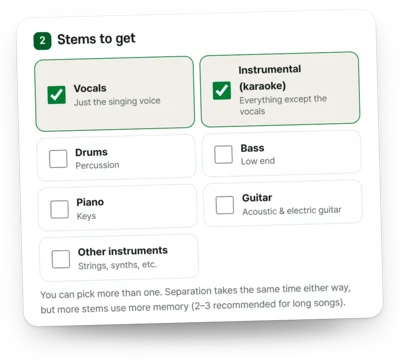
Use it when you want to
- You need a backing track to practise a song for yourself
- You want to hear only your part for choir or band (a cappella)
- You need a backing track without drums or bass to practise an instrument
- You want just the vocals from a song you made with Suno
How to make a karaoke track
- Upload the songMP3, WAV, M4A, FLAC, OGG or the sound of a video (MP4).
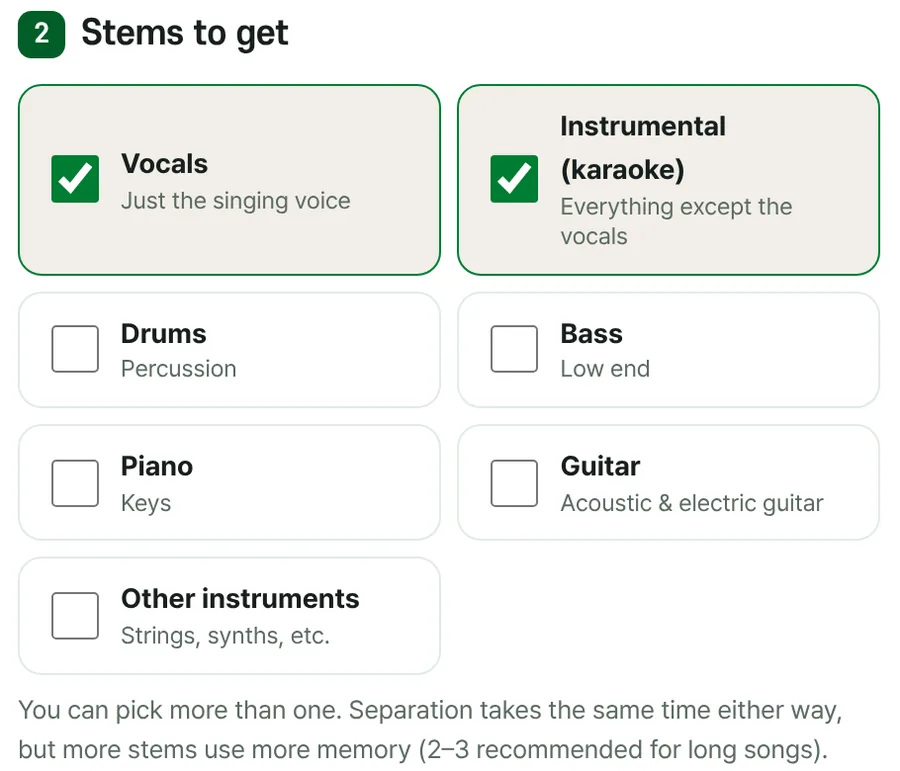
- Pick ‘Instrumental (karaoke)’For the music without vocals pick Instrumental (karaoke); for the voice only pick Vocals. Drums, Bass, Piano and Guitar can be picked separately too.
- SeparateAI splits the whole song. Depending on its length and your device it takes from a few minutes to a few dozen. The first time, the AI model (about 130–260 MB) is downloaded once.
- Listen and downloadPlay each stem and download it as WAV (original quality) or MP3 (smaller).
Real screenshots
Tips for a cleaner karaoke track
- Upload a file close to the original. WAV or a high-quality MP3 separates more cleanly than an MP3 compressed many times.
- In songs with thick choruses or harmonies, a little vocal echo may remain in the backing.
- Opening www.sselmo.com in Chrome or Edge on a PC is faster.
- Copyright: backing tracks taken from other people’s songs are for personal practice only. Playing them at an event or posting them in a video needs permission from the rights holders (songwriter and label).
FAQ
Can I make a karaoke track for free?
Yes. Upload the file, pick Instrumental (karaoke) and separate. It is free with no limit on the number of songs.
Can I keep only the vocals?
Yes. Pick only Vocals to get the voice without the backing (a cappella).
How long does it take?
From a few minutes to a few dozen, depending on the song’s length and your device. Chrome or Edge on a PC is recommended.
Is my file uploaded to a server?
No. The AI runs inside your browser, so the audio never goes to a server.
Can I make sheet music from it too?
Yes. Press ‘Send to sheet music maker’ and the separated vocals and instruments go straight to the AI sheet music maker.
Just add a file to start — free, no sign-up
sselmo music tools
More guides
- Suno to sheet musicTurn a Suno song into a score
- MP3 to sheet musicTranscribe a song file into notes
- Piano accompaniment makerA piano part from the chords
- Song melody sheet musicMelody score with lyrics & solfège
- Karaoke track makerRemove vocals for a backing track
- Backing track for coversBacking tracks for cover videos
- Export sheet musicPDF, MusicXML or MIDI
© 2026 sselmo (sselmo.com) · Trademark application 40-2026-0132938 · Free tools for everyone
Your audio never goes online — it is processed only in this browser. Suno is a trademark of Suno, Inc. and is not affiliated with sselmo.
The program, design and text on this page are sselmo’s work. Do not copy, modify or redistribute without permission. · Checked 2026-11-22